Miren v0.14: Release Highlights
You build the app. We'll take the fiddly bits: secrets, tasks, maintenance windows, SQLite, and reaching clusters off the public internet.

Most people deploy an app because they care about what it does, not because they want another system to operate. There is, of course, a small exception for sickos like us ✌️.
Miren’s mission is to take the fiddly bits off your plate. We give recurring operational work a dependable home in the platform, choose useful defaults, and leave you more time to work on your app and serve your users. In each of our releases you’ll see us chipping away at this goal in different areas.
v0.14 takes on several of the problems that appear once an app gets real. Credentials need a safe place to live. Migrations and scheduled jobs need a reliable place to run. Data needs a durable place to land. These features live in different parts of Miren, but they all make the same move: more of deploying an app becomes Miren’s job instead of your job.
Secrets are more than just strings you don’t look at
Until now Miren could mark a config variable sensitive, which kept it out of normal CLI output. The value itself still lived in the app’s config, in plaintext. That is useful for keeping a terminal tidy. It is not a secret store.
v0.14 adds one. Store a credential in the cluster, then point an environment variable at it:
miren secret set payments/stripe-key
miren env set -e STRIPE_API_KEY --ref payments/stripe-key
Miren encrypts the value at rest and puts only the reference in your app’s
config. The plaintext appears in memory when Miren starts the container, then
your app reads STRIPE_API_KEY like any other environment variable.
Every deploy pins the exact secret version it used. That means a rollback gets the value the old release actually ran with, not whichever value happens to be current today. Useful for when a planned rotation goes sideways.
Dockerfile builds can use the same store through BuildKit secret mounts. Miren
hands a private package token to one RUN step without turning it into a build
argument or writing it to a layer or log. Your build command can still leak the
value if it copies or prints it, so the mount is a safer path rather than magic.
The secrets guide covers rotation, revocation,
build mounts, and the keyring you need to back up.
We built this to support multiple secret storage backends, so we plan to integrate with external secret managers as well. Hit us up to tell us which one you’d like to see land first!
A chore list for your app
A service is a process Miren keeps running. A task is a command Miren knows how to run. Database migrations, cleanup jobs, backfills, and reindexes were always the second kind, even when we made them impersonate the first.
Now they can say what they are:
[tasks.migrate]
command = "bin/rails db:migrate"
trigger = "deploy"
timeout = "10m"
A deploy task runs from the new image before that version takes traffic. If the task fails, the deploy fails and the previous version keeps serving. If it succeeds, the version flip continues. The migration is part of the deploy now, not something snuck into a boot script or a step somebody has to remember to run manually.
Tasks can also run on a systemd calendar schedule or on demand. Every run gets a fresh sandbox and a durable record with its logs and exit code. You can detach from a run and reattach later:
miren app run --task reindex --detach
miren app runs
miren app attach run/myapp-reindex-4kq
An app can even consist entirely of tasks, with web = false and nothing
kept running between invocations. The tasks guide
has the full trigger model, scheduling behavior, and the places where task
ordering and disks still have more work planned.
Shut the front door!
Sometimes you have a job that cannot safely happen while requests are arriving. Handling this inside your app is not especially complex, but it’s a chore that tends to get deferred until you need it. Then you’re wiring it up under pressure.
Miren’s maintenance mode makes it a routing decision:
miren route down app.example.com \
  --reason "Upgrading the database" \
  --back-at 15:00

miren app run -a web -- ./bin/migrate
miren route up app.example.com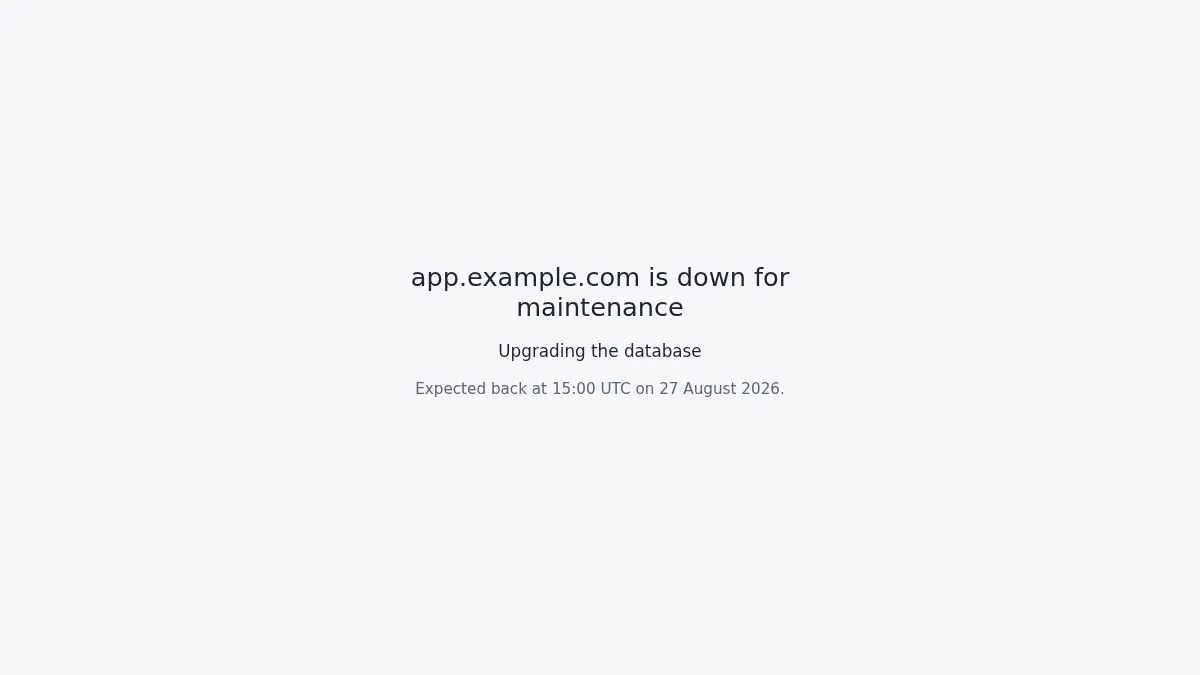
Visitors get a holding page with HTTP 503 and an optional Retry-After. The app
itself never stops, so one-shot commands and internal traffic keep working
through the window. Other routes pointing at the same app keep serving too.
The maintenance mode guide gets into the
details, including what happens to background workers and why --back-at is a
promise to visitors rather than a timer that brings the route back up.
SQLite joins the addon shelf
We’re in a bit of a SQLite Renaissance right now, and for good reason. It’s solid tech that’s easy to reach for when getting started, and it scales surprisingly well.
We wanted to make the path from “SQLite is enough” to “SQLite is safely backed
up” much shorter. The new miren-sqlite addon puts that shape behind the same
declaration as any other Miren addon:
[services.web.concurrency]
mode = "fixed"
num_instances = 1

[addons.miren-sqlite]
variant = "standard"
Your app gets DATABASE_URL=file:/data/data.db. Miren continuously replicates
the database (we ❤️ Litestream!)
and restores it when the local copy is missing.
This one’s early, and its backup path still has a few sharp edges. Try it on data you can recover and tell us what breaks. The SQLite addon docs spell out the constraints and current caveats.
The Miren CLI routes over Miren Anywhere
We launched Miren Anywhere so that a cluster behind
NAT could serve its apps to the public internet via a relay coordinated by
Miren Cloud. App traffic could ride that path, but miren deploy, miren logs, and the rest of the CLI still needed a direct network route to the
cluster.
With this release, we’ve closed that gap. Now when you run miren cluster add,
we first try to work out a direct path to the cluster. If we cannot find one,
we relay the CLI through Miren Cloud instead. You can also choose that path
explicitly with --via-cloud.
The CLI sends its RPC traffic over the authenticated connection the cluster already holds to Miren Cloud. Your own credentials stay inside the request all the way to the cluster. Cloud relays the bytes; the cluster still authenticates you and applies its own roles exactly as it would on a direct connection.
We want clusters that do not sit directly on the public internet to be just as usable as clusters that do, and reachable when you want them to be. A cluster with a direct path keeps using it. The relay fills in the missing route when there isn’t one.
And quite a bit more
Builds and sandbox startup now use our saga engine by default. It journals each step, so a control-plane restart can resume or unwind the operation instead of stranding it. We have a technical deep dive on sagas coming too.
Sandboxed apps can now call the cluster API using their own workload identity. Routes can carry individual request timeouts. Standard Next.js apps now auto-build without a Dockerfile, debug output is much more readable, and a long list of sharp little bugs are gone.
The v0.14 changelog has the complete list. If you’re already running Miren, upgrade and take the new pieces for a spin. If you haven’t tried it yet, get started and put the whole thing on a box you control. Want us to handle the provisioning instead? Check out our managed clusters, now in early access!